
MU Immortal delivers the classic MMORPG experience fans cherish—level grinding, stat optimization, and crafting the ultimate character. While designed for mobile, playing on PC with BlueStacks unlocks powerful tools that enhance every aspect of your journey, making it smoother and more engaging. From tailored controls to managing multiple characters simultaneously, these features offer more than just convenience—they empower you to play more efficiently.
This guide highlights key BlueStacks features and how they seamlessly integrate with MU Immortal. Whether you’re a beginner or deep into offline farming, these tools provide a significant advantage.
Tailor Controls and Shortcuts with the Keymapping Tool
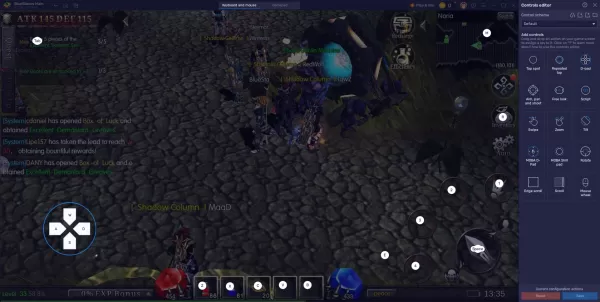
The Keymapping Tool stands out as a highly effective feature in BlueStacks, particularly for MU Immortal, where managing skills, potions, and menus is constant. While the game is built for touch controls, a keyboard and mouse offer superior precision and faster access to critical actions.
This is especially valuable for players running multiple accounts in offline farming, as it ensures each character is optimized before you log off. Proper synchronization keeps all accounts progressing evenly, maintaining consistent resource output.
MU Immortal’s built-in features like auto-play and offline farming streamline gameplay, but BlueStacks takes efficiency further by aligning with the game’s demands. Its tools enhance how you interact with the game’s core systems.
If you’re playing MU Immortal or considering diving in, don’t let mobile limitations hold you back. Download BlueStacks for a smoother, faster, and highly customizable PC gaming experience, letting you focus on the thrill of the game rather than the grind.
 Latest Downloads
 Downlaod




 Top News